Hosting & Domains
Best Tools to Launch a Website in 2026: What Stack Should You Actually Use?
The verdict
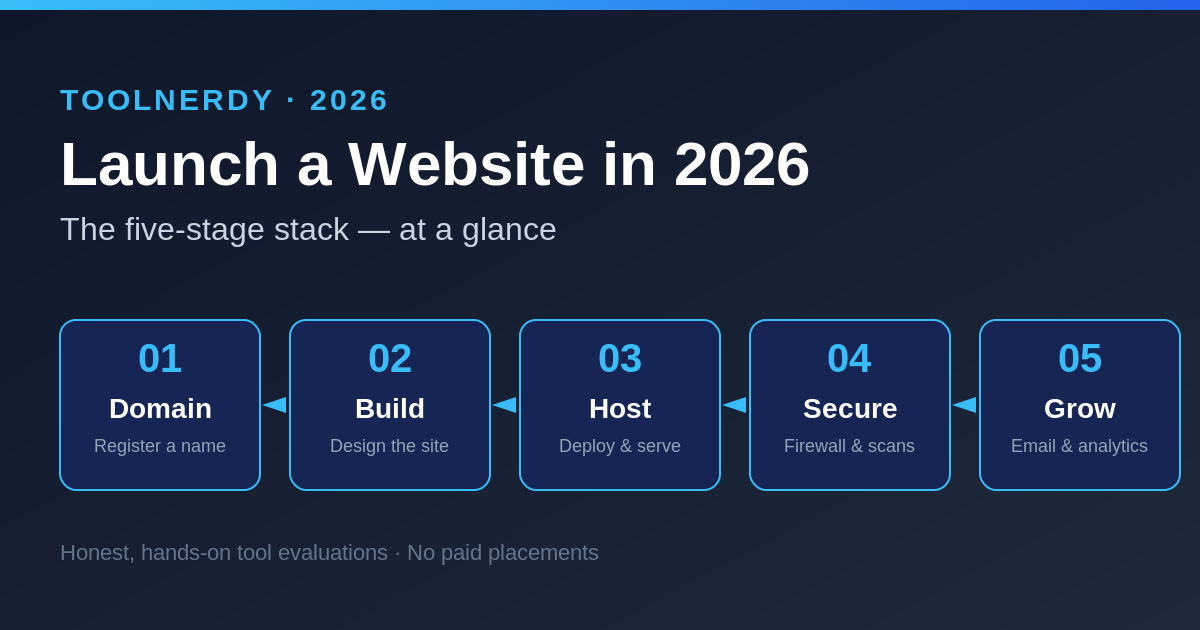
The five-stage stack for launching a website in 2026 — domain, build, host, secure, and grow — with our pick at each step and links to every full review.
Methodology: This roundup is a research-based overview, not a hands-on lab test. Any assessment is an editorial judgement drawn from each tool’s published 2026 pricing and features plus aggregated public reviews — not our own benchmarking. Prices were checked in June 2026 and can change; always confirm on the vendor’s site.
Spinning up a website in 2026 means stitching together five things: a domain, a way to build the site, somewhere to host it, a layer to secure it, and tools to grow an audience. There are dozens of options at every stage, and most “best of” lists are just whatever pays the most. So what should you actually use — and where is it worth spending versus staying free? Below is the stack we’d recommend, with links to our full review of each tool.
Stage 1 — Get your domain
Your domain is the one purchase you’ll renew every year for the life of the site, so a registrar with honest renewals (not just a cheap first year) matters more than a flashy launch deal.
Dynadot — our pick for clean, upsell-free domains
Dynadot keeps the buying flow refreshingly free of upsells, and WHOIS privacy is included at no charge. Standard .com registrations run about $10.88/year (renewals around $10.99), and the registrar runs frequent promo codes that can push a first-year .com lower. It’s a strong fit if you want predictable renewal pricing and a no-nonsense control panel. Read our full Dynadot review (2026) for the details.
Check current Dynadot domain prices →
Prefer an alternative? Namecheap is the other budget mainstay, with free WhoisGuard and a deep TLD catalogue — see our full review to compare.
Stage 2 — Build the site
How you build depends on who’s driving. Designers and marketers usually want a visual, no-code canvas; WordPress users want a page builder; everyone wants something they won’t outgrow in six months.
- Webflow — the visual builder developers actually respect, for pixel-level control without hand-coding.
- Framer — the fastest path from a clean design to a live site, popular with designers.
- Wix — the most beginner-friendly all-in-one, now with AI-assisted setup.
- Elementor — if you’re on WordPress, still the most capable drag-and-drop page builder.
Stage 3 — Host and deploy
Static and front-end sites have different hosting needs than a full app. Match the platform to what you’re shipping.
- Vercel — the standard for deploying modern front-end frameworks with zero-config previews.
- DigitalOcean — developer-friendly cloud for when you need a real server, not just static hosting.
- Cloudflare — put its CDN in front of anything for speed and DDoS protection; the free tier covers most small sites.
Stage 4 — Secure it
Once the site is public it’s a target. A WordPress site in particular benefits from a firewall and malware scanning layer that doesn’t depend on you patching everything by hand.
Sucuri — our pick for hands-off site security
Sucuri pairs a website firewall (WAF) with malware scanning and cleanup, which is why it’s a long-standing default for WordPress owners who’d rather not manage security themselves. Full platform plans start at $199.99/year (Basic), with Pro at $299.99 and Business at $499.99; a lighter firewall-only tier starts around $9.99/month but doesn’t include hands-on malware removal. It’s overkill for a tiny static page, but well-matched to a CMS-driven site that handles logins or payments. Our full Sucuri review (2026) weighs whether it’s still worth it.
Stage 5 — Grow: email, forms, and analytics
Launching is the easy part; building an audience is the work. This is where a website turns into a business.
GetResponse — our pick for all-in-one email and landing pages
GetResponse bundles email marketing, automation, and landing pages in one subscription, so you’re not paying for three separate tools. There’s a genuinely usable free plan (up to 500 contacts and 2,500 emails/month), and paid plans start at $19/month (Starter), rising to Marketer ($59) and Creator ($69) tiers; annual billing trims roughly 18%. The catch, as we note in our review, is that per-contact pricing climbs as your list grows. See the full GetResponse review (2026).
Try GetResponse (free plan available) →
Rounding out the growth stack: Typeform for forms and surveys people actually finish, and Plausible for lightweight, privacy-first analytics without the Google Analytics overhead.
How we picked (editorial)
These aren’t ranked by commission. We favoured tools with transparent, published pricing, a track record reflected in public user reviews, and a clear best-fit use case rather than trying to be everything to everyone. Where a category had a strong free option (Cloudflare, Plausible, GetResponse’s free tier), we said so. The three affiliate-linked tools earned their spot on the same basis as everything else; the link is how the site keeps the lights on, not why they’re here.
The quick-start stack
If you just want a sensible default: register the domain at Dynadot, build with Framer or Wix, put Cloudflare in front, add Sucuri if you’re on WordPress, and start collecting emails with GetResponse’s free plan. You can launch for the price of a domain and upgrade only where it pays off.
Sources
Pricing and features verified June 2026 from:
- Dynadot — official domain price list and 2026 price update notice
- Sucuri — SoftwareSuggest pricing and Findstack pricing
- GetResponse — Email Vendor Selection and EmailTooltester